
SEO Software Cost Calculator 2026: Compare Monthly Tool Pricing
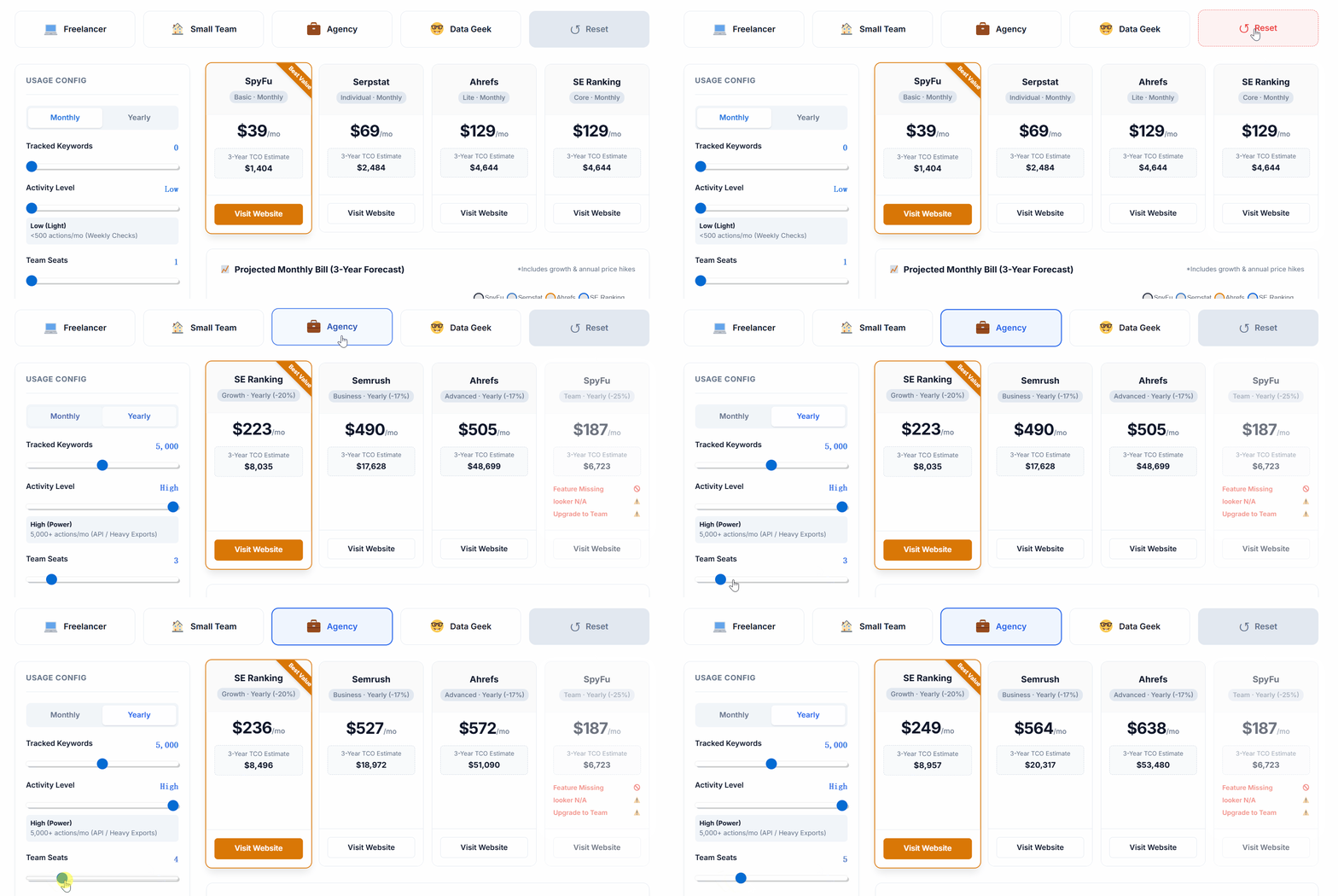
Use this free SEO software cost calculator to compare plans, seats, projects, keyword tracking limits, feature gates, and projected 3-year software costs.
SEO software pricing comparison
Calculate and compare your real SEO software cost
Choose a scenario or adjust the controls to compare monthly pricing, required plan upgrades, feature availability, and estimated 3-year ownership cost across SEO platforms.
Pricing data last reviewed: July 23, 2026. Vendor pricing and limits can change; confirm the current plan and price on the provider’s official pricing page before buying.
Secondary analysis
Cost context
Review the 3-year forecast and monthly cost components.
Monthly cost breakdown
| Tool | Base plan | Base price | Extra seats | Add-ons | Discount | Total |
|---|
What this SEO software cost calculator estimates
This calculator is designed for teams comparing SEO platforms before choosing or upgrading a plan.
SEO execution model
Agency, freelancer, or in-house SEO?
Compare execution models after estimating your monthly SEO budget.
Read the SEO execution comparisonDecoding Your Budget with an seo budget calculator
Quick answer: a realistic SEO budget includes more than a monthly tool subscription. You need to account for SEO software, keyword tracking limits, projects, user seats, content production, technical audits, reporting, freelancer or agency support, and upgrade thresholds.
This SEO cost calculator is designed for founders, agencies, and marketing teams that need a practical SEO budget calculator, not a generic estimate. Use it to model monthly cost before buying tools such as Ahrefs, Semrush, SE Ranking, SpyFu, or similar platforms.
Using an accurate seo budget calculator is the first critical step in planning a successful digital marketing campaign for the upcoming fiscal year. Many business owners approach organic search with the same mindset as paid advertising (PPC). However, while PPC has transparent, immediate per-click pricing, organic search requires a much more nuanced seo estimate.
Think of it as the difference between renting and buying digital real estate. PPC is renting; the moment you stop paying, your traffic drops to zero. SEO is buying; you are building an asset that yields compounding returns over time. Because of this structural difference, an effective seo cost calculator must account for long-term investments rather than short-term clicks.
The 3 Core Pillars of Your Monthly Budget
When you input your company data into our seo cost calculator to plan your annual spend, you are essentially allocating funds across three distinct operational pillars. Neglecting any single pillar usually results in stagnant organic traffic. Let us break down the real-world costs associated with each:
1. Software & Technical Infrastructure
Professional data tools are non-negotiable. Even if you handle your optimization in-house, expect to spend $200 to $600 monthly just on data access. This includes crawler software, rank trackers, and competitive intelligence from platforms like Ahrefs, Semrush, or SurferSEO.
2. High-Fidelity Content Production
Google’s helpful content algorithms (HCU) heavily favor topical authority and human expertise. You cannot rely on cheap, mass-produced text anymore. High-quality content requires specialized copywriters and subject matter experts (SMEs). In the B2B or SaaS space, a single comprehensive, expert-led article can cost anywhere from $300 to $800.
3. Digital PR & Link Building
This is frequently the most expensive, yet most impactful, variable in any accurate seo estimate. Acquiring high-authority backlinks dictates whether your target keywords rank on page 1 or get permanently stuck on page 5. Industry averages show that a single quality backlink (DR 50+) can cost an agency $150 to $400 in acquisition and labor costs.
💡 Pro Tip – The Danger of Under-Budgeting: Beware of agencies or freelancers offering “$299/month guaranteed first-page rankings.” True search engine optimization requires significant manual labor, relationships, and premium tools. Cheap services often utilize automated black-hat tactics that can result in catastrophic algorithmic penalties for your domain. Before finalizing your marketing spend, we strongly recommend reading our deep-dive analysis on the hidden costs of low-price SEO.
B2B SaaS vs. E-commerce: Why Your Industry Dictates the Budget
A major flaw in many generic marketing guides is assuming all websites require the same investment. When you utilize an advanced seo budget calculator, the underlying algorithm must account for your specific industry model, particularly Customer Lifetime Value (CLTV) and Cost Per Acquisition (CPA).
- The B2B SaaS Model ($3,000 – $10,000+/month): If you are selling enterprise software, your sales cycle is months long, and a single converted lead might be worth $50,000 annually. Therefore, your seo estimate must include budgets for white papers, original data studies, and premium digital PR to build massive topical authority.
- The E-commerce Model ($1,500 – $5,000/month): An online store relies on high-volume, transactional keywords. Here, the seo cost calculator allocates more budget toward programmatic SEO, category page optimization, faceted navigation structures, and technical indexing rather than long-form blog content.
The “Hidden” Technical Costs Nobody Mentions
Many businesses mistakenly believe that paying an agency covers 100% of the organic search investment. However, a holistic seo budget calculator must also account for internal developer resources. Technical optimization often uncovers severe structural issues that an agency cannot fix without access to your core codebase.
- Server & Hosting Upgrades: Core Web Vitals (speed and interactivity) are direct ranking factors. Moving from shared hosting to a dedicated cloud environment adds $50 to $300 to your monthly base costs.
- JavaScript Rendering Solutions: Modern SaaS websites built on React or Angular often struggle with Googlebot crawling. Implementing dynamic rendering requires specialized developer hours, which bill at $100+ per hour.
- Content Decay (Historical Optimization): SEO is not a “set it and forget it” strategy. As content ages, it loses rankings to fresher competitors. You must budget for “Content Refreshing”—allocating at least 20% of your editorial budget to updating and expanding articles that are 12 to 18 months old.
Agency Retainers vs. In-House Resource Allocation
Should you hire an external agency or build an internal marketing team? Relying on an objective seo cost calculator helps visualize this critical financial divide. A reputable mid-level to advanced SEO agency typically charges a monthly retainer ranging from $2,000 to $6,000, depending strictly on the scope of deliverables.
While handing over a $4,000 monthly retainer to an agency might seem steep initially, building an effective internal department requires multiple full-time salaries: an SEO Strategist ($80k/yr), a Content Writer ($60k/yr), and an Outreach Specialist ($50k/yr). When you factor in payroll taxes and software subscriptions, an in-house team easily exceeds $15,000 per month. For most B2B companies, outsourcing remains the most capital-efficient route to dominating search results.
The Timeline: Setting Realistic ROI Expectations
Finally, the most important rule when reviewing your seo estimate is pairing your budget with realistic timelines. SEO is a flywheel you push. Here is the standard progression:
Step 1: Months 1-3 (The Foundation)
Heavy expenditure on technical audits, keyword gap analysis, and fixing website architecture. Traffic rarely increases here.
Step 2: Months 4-6 (The Content Push)
Publishing high-quality hubs and acquiring initial backlinks. You will see impressions rise in Google Search Console, but significant leads may still be lagging.
Step 3: Months 7-12+ (The ROI Phase)
The compounding effect takes hold. Content reaches page 1, organic traffic spikes, and the cost-per-acquisition (CPA) drops dramatically compared to paid ads.
Frequently Asked Questions About SEO Costs
How accurate is an online seo cost calculator?
An online seo cost calculator is highly accurate for generating baseline estimates based on industry averages. However, your final proposal will depend on a manual technical audit of your specific website’s history and current penalty status.
Should I adjust my seo budget calculator annually or quarterly?
We recommend running your metrics through an seo budget calculator bi-annually. As your domain authority increases, you can often pivot your budget away from aggressive link building and reallocate those funds toward conversion rate optimization (CRO).
Why is my seo estimate so much higher than my Google Ads budget?
Your initial seo estimate might appear higher because it involves heavy front-loaded labor. However, over a 24-month period, the blended Cost Per Lead (CPL) for organic search almost always becomes significantly cheaper than continually bidding on Google Ads.
Explore the full SEO cost hub
Use the hub to move between the SEO calculator, budget estimator, low-price hidden-cost guide, and software or agency cost comparison.