In the great debate of MailerLite vs Mailchimp, which platform is right for you?
In the rapidly evolving landscape of digital marketing, selecting the right Email Service Provider (ESP) is one of the most foundational decisions a business can make. Whether you are a solo creator launching your very first newsletter, or a scaling marketing agency managing communications for enterprise clients, your email platform is the beating heart of your customer relationships.
For over two decades, one name has been virtually synonymous with email marketing: Mailchimp. As an industry pioneer, Mailchimp has grown into a comprehensive, enterprise-grade powerhouse that offers an incredible ecosystem of marketing tools. However, as the digital landscape diversifies, a highly popular alternative has captured the attention of creators, freelancers, and small businesses: MailerLite.
Recognized widely as one of the most intuitive and affordable alternatives on the market, MailerLite has built a massive following by focusing on a specific philosophy: “Keeping it Lite”.
The truth is, neither platform is objectively “better” or “worse.” Instead, they are built for entirely different types of businesses, budgets, and operational workflows. In this comprehensive guide, we will break down both platforms feature by feature. Using insights from Email Marketing Cost Calculator, we will explore their pricing structures, highlight their unique strengths, and help you forecast your 3-Year Total Cost of Ownership (TCO) so you can make an empowered, data-driven decision.
——————————————————————————–
Part 1: Platform Philosophies — The All-in-One vs. The Streamlined Specialist
To truly understand the MailerLite vs Mailchimp comparison, we must first look at the core design philosophy driving each company. They have taken two very different paths to help businesses grow.
Mailchimp: The Comprehensive Marketing Ecosystem
Mailchimp has evolved far beyond a simple email newsletter tool. Today, it positions itself as an all-in-one Marketing, Automation, and CRM platform. When you invest in Mailchimp, you are investing in a robust ecosystem designed to handle complex, multi-channel marketing campaigns.
• Deep Integrations: With over 300+ integrations, Mailchimp connects flawlessly with major e-commerce platforms like Shopify, WooCommerce, and Salesforce.
•Advanced Capabilities: Mailchimp offers features that cater to advanced marketing teams, including SMS marketing, AI-powered send time optimization, custom-coded templates, and predictive demographics.
• The Target Audience: Mailchimp is brilliantly suited for established e-commerce brands, B2B companies with complex sales cycles, and organizations that require a heavy, centralized hub for all their marketing operations.
MailerLite: “Keeping it Lite” for Creators
MailerLite’s approach is fundamentally different. Their philosophy, “Making the complex simple is what we do best,” is evident in every aspect of their user interface. MailerLite intentionally strips away the heavy, enterprise-level CRM functionalities that many small businesses never use, focusing instead on delivering the most essential tools flawlessly.
• Creator-Centric Tools: MailerLite shines when it comes to tools for the creator economy. They offer beautiful landing pages, direct integration with Stripe for selling digital products, and native support for paid newsletter subscriptions.
• Intuitive Design: Their AI-powered drag-and-drop editor is widely praised for its simplicity, allowing users with zero coding experience to design stunning, mobile-responsive campaigns.
• The Target Audience: MailerLite is the ultimate platform for content creators, bloggers, freelance writers, solopreneurs, and small agencies who want high-quality email marketing without the complexity of an enterprise software suite.
——————————————————————————–
Part 2: Feature Showdown — Matching Capabilities to Your Business Needs
When evaluating MailerLite vs Mailchimp, the feature sets reveal exactly who these platforms are built for. Let’s break down the core components of email marketing and see how both platforms stack up.
1. Landing Pages and Website Builders
Both platforms recognize that capturing emails is just as important as sending them.
• MailerLite offers a highly impressive website and landing page builder. Even on their affordable $10/month Growing Business plan, users get access to unlimited websites and blogs, along with unlimited landing pages. For a small business owner, this means you can build your entire digital storefront, host a blog, and capture leads all within MailerLite, eliminating the need to pay for external website builders like Wix or Squarespace.
• Mailchimp also provides excellent landing page capabilities and forms. However, Mailchimp’s strength lies in its ability to integrate these forms into its broader CRM and analytics engine. If you want to track a user’s journey from a landing page click, to an e-commerce purchase, to an SMS follow-up, Mailchimp’s infrastructure is built exactly for this kind of deep tracking.
2. E-commerce and Monetization
• Mailchimp is an absolute titan in the e-commerce space. If you run a large Shopify or WooCommerce store, Mailchimp is arguably the industry standard. It can pull product catalogs directly into your emails, trigger complex abandoned cart workflows based on granular user behavior, and provide deep ROI reporting that connects email clicks directly to store revenue.
• MailerLite takes a different, highly effective approach tailored for digital creators. While it does integrate with Shopify and WooCommerce, its standout feature is the ability to sell directly through the platform. You can sell e-books, digital downloads, and set up recurring paid newsletter subscriptions using their native Stripe integration. This frictionless monetization is a game-changer for independent creators.
3. Automation and Customer Journeys
• Mailchimp’s “Customer Journey Builder” (now known as Marketing Automation Flows) is incredibly sophisticated. It allows for branching logic, multi-step triggers, and deep behavioral targeting. However, access to these multi-step flows is structured across their tiered plans, with the most advanced features reserved for Standard and Premium users.
• MailerLite provides a highly visual, clean automation builder that is remarkably generous. They provide essential triggers (like “anniversary,” “link clicked,” or “form submitted”) and allow you to build complex workflows easily. It is perfectly suited for delivering 5-day welcome sequences or email courses without requiring a steep learning curve.
4. CRM and Audience Management
• Mailchimp leans heavily into CRM capabilities. It allows you to assign role-based access, tag users with extensive metadata, and score leads. This is highly valuable for sales teams that need to know exactly how “warm” a prospect is.
• MailerLite focuses on straightforward audience management. Instead of a complex Sales CRM, they use a highly effective system of Interest Groups (tags) and Segmentation. This keeps the interface clean and ensures you are only paying for email marketing, rather than subsidizing a sales CRM development team.
——————————————————————————–
Part 3: Demystifying the Pricing Structures
The most discussed topic in the MailerLite vs Mailchimp conversation is pricing. Both platforms offer tiered pricing based on the number of subscribers (contacts) you have, but their structural approaches differ significantly. Let’s examine the entry-level options and how they scale.
The Free Plans: A Starting Point for Beginners
If you are just starting out with zero budget, both platforms offer generous Free plans to help you launch.
• Mailchimp’s Free Plan: Allows for up to 250 contacts and 500 monthly email sends. It is a fantastic way to experience the premium Mailchimp interface, use their pre-built templates, and access basic reporting without any upfront investment.
• MailerLite’s Free Plan: Offers a higher capacity, allowing for up to 500 subscribers and 12,000 monthly email sends. It also generously includes the drag-and-drop editor, the email automation builder, and the ability to create 10 landing pages. For a new creator building an initial audience, MailerLite provides an incredibly wide runway before requiring a paid upgrade.
Scaling Up: How Costs Grow With Your Audience
As your business grows, you will transition to paid plans. It is crucial to understand how costs scale alongside your success.
• Mailchimp structures its pricing into three main paid tiers: Essentials (starts at $13/mo), Standard (starts at $20/mo), and Premium (starts at $350/mo). Mailchimp is designed so that as your marketing sophistication grows, you move up the tiers. The Standard plan is highly recommended for businesses that want to fully utilize Mailchimp’s advanced optimization tools and generative AI features.
• MailerLite keeps its paid tiers incredibly straightforward: Growing Business (starts at $10/mo) and Advanced (starts at $20/mo). MailerLite’s pricing curve is notably smooth. Because they do not bundle heavy CRM features into their software, their infrastructure costs remain low, allowing them to offer highly competitive pricing even as your list grows to 5,000 or 10,000 subscribers.
The Annual Discount Strategy
When forecasting your budget, it’s important to look at the discounts offered for annual commitments.
• Mailchimp offers a great 15% discount for businesses that commit to a 12-month plan. However, this specific offer is tailored for established businesses—it is applicable to users who have 10,000+ contacts. If you are a smaller business below that threshold, you will operate on standard monthly pricing.
• MailerLite offers a flat 10% discount for paying yearly. This discount is available universally, meaning even a beginner on the $10/month plan can take advantage of annual savings to optimize their initial cash flow.
——————————————————————————–
Part 4: Team Collaboration and the Seat Allocation Model
One of the most critical, yet often overlooked, factors in choosing an ESP is how the platform handles team collaboration. If you run a marketing agency, or if you plan to hire a freelance copywriter, a graphic designer, or a virtual assistant, you need to understand how “User Seats” impact your billing.
In the MailerLite vs Mailchimp evaluation, we see two distinct business models for team expansion.
Mailchimp: Tiered Role-Based Access
As an enterprise-ready platform, Mailchimp aligns its user seats with its feature tiers. This ensures that larger organizations paying for premium features also have the seat capacity to manage them.
• Essentials Plan: Includes up to 3 Seats (and 2 roles).
•Standard Plan: Includes up to 5 Seats (and 4 roles).
• Premium Plan: Unlocks Unlimited Seats and 5 roles, alongside a massive suite of enterprise features.
For a mid-sized agency that requires 6 or 7 team members to access the platform simultaneously, Mailchimp requires an upgrade to the Premium plan (starting at $350/month). This provides the agency with unlimited seats and top-tier support, which is often a necessary investment for large-scale operations managing complex, high-revenue campaigns.
MailerLite: Uncapped Collaboration
MailerLite approaches team collaboration with a focus on flexibility for small businesses and creative collectives.
• Growing Business Plan: Includes 3 user seats.
• Advanced Plan: For just a slight increase in base price (starting at $20/month), MailerLite provides Unlimited user seats.
For a lean marketing agency or a content creator with a sprawling team of remote freelancers, MailerLite’s Advanced plan offers an incredibly cost-effective way to collaborate. You can invite your entire team into the dashboard without needing to upgrade to an enterprise-level pricing tier.
——————————————————————————–
Part 5: Visualizing Your 3-Year TCO Forecast
While looking at monthly starting prices is helpful, the most strategic way to evaluate software is by calculating the Total Cost of Ownership (TCO) over a longer period. Email marketing is a long-term investment. If you are doing your job right, your subscriber list will grow every month, and your costs will adjust accordingly.
To help you visualize this, we have developed a powerful Email Marketing Cost Calculator. It allows you to input your current subscriber count, your expected Monthly Growth Rate (MoM), and the specific features you need, projecting your exact costs over the next 36 months.
Let’s Look at a Realistic Growth Scenario
Imagine you run a growing digital agency. You have a healthy list of 2,500 subscribers and expect a steady 5% month-over-month growth. Most importantly, because you have a dedicated team of copywriters and analysts, you need 6 team seats to manage the account efficiently.
When we plug these numbers into the calculator, we see a fascinating structural difference in how both platforms accommodate this specific agency setup.
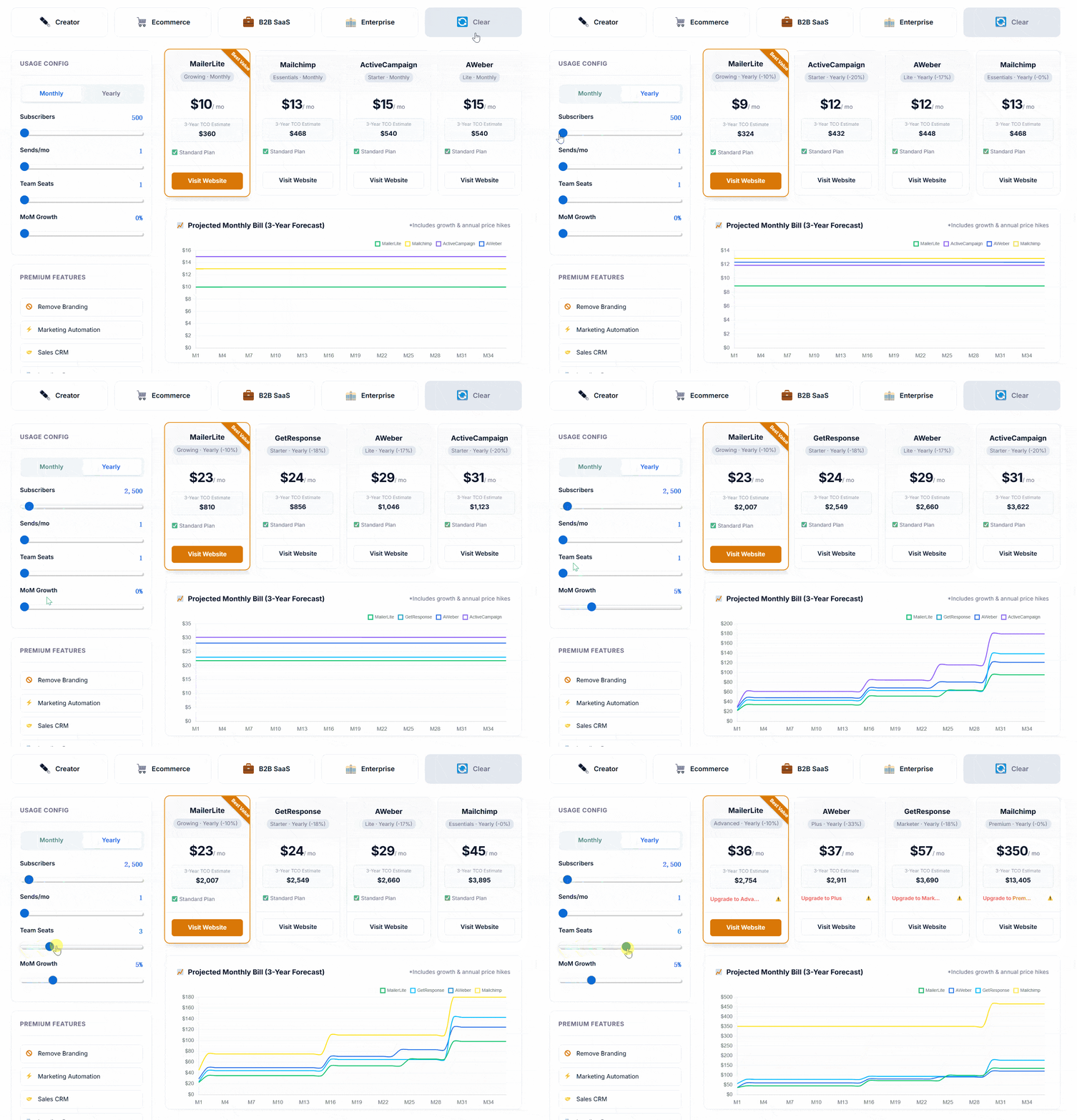
Curious about your own 3-Year projection? Enter your subscriber count, team size, and feature requirements into the calculator to find the most cost-effective platform for your unique growth curve.
Analyzing the Scenario:
• Because the agency requires 6 team seats, Mailchimp naturally guides this user to its robust Premium Plan. While this plan starts at $350/mo, it provides the unlimited seats the agency needs, plus priority support and advanced generative AI tools necessary for enterprise-scale campaigns. Over 3 years, the TCO reflects the investment in a premium, comprehensive marketing suite.
• Conversely, MailerLite accommodates the 6-seat requirement on its Advanced Plan (which starts at just $20/mo for 2,500 subscribers). As the list grows 5% each month, MailerLite’s pricing scales gradually along its subscriber tiers. Over 3 years, the TCO remains remarkably low, making it an incredibly attractive option for budget-conscious agencies that prioritize lean operations over complex CRM features.
Both paths are valid; the calculator simply helps you align your software investment with your actual operational budget.
——————————————————————————–
Part 6: Deep Dive Analytics Comparison: Tracking Your Success
When making a definitive comparison between MailerLite vs Mailchimp, you must look beyond just sending messages. You need to understand how your audience interacts with your content. Robust analytics are essential for any growing business.
To track a user from a landing page click to an ecommerce purchase, you need a dashboard that provides clear, actionable data. Mailchimp has historically offered deeper data tracking, but MailerLite has rapidly caught up, offering intuitive visual reports that make understanding your metrics incredibly easy.
Advanced Email List Management Strategies
Your email list is your most valuable asset. However, as your list grows, so do your costs. Effective list management is what separates amateur senders from professional marketers. You must regularly clean your contacts to remove inactive subscribers.
Using Email Marketing Cost Calculator, we found that pricing tiers on both platforms jump significantly once you cross the 10,000 subscriber mark. By utilizing the built-in segmentation features on these email marketing platforms, you can ensure you are only paying for engaged readers. You can always visit True SaaS Cost to model exactly how these pricing tiers will affect your monthly budget as your list expands.
Evaluating Email Deliverability: Reaching the Inbox
What good is a beautifully designed campaign if it lands in the spam folder? This is where email deliverability becomes the most critical metric. High deliverability ensures that your messages reach the primary inbox of your target audience.
Both MailerLite and Mailchimp have strict anti-spam policies to protect their sender reputations. They both offer dedicated IP addresses for high-volume senders, ensuring that your email marketing strategy isn’t derailed by technical delivery failures.
Exploring Email Templates and Design Services
Creating visually stunning messages is easier than ever. Both platforms offer excellent design services and extensive libraries of templates. Whether you are starting from scratch with basic templates or looking for highly stylized newsletter templates, you are covered.
Furthermore, setting up automated flows requires specialized automation templates for scenarios like welcome emails or abandoned cart reminders. Mailchimp’s library is vast, but MailerLite’s drag-and-drop editor is universally praised for its modern aesthetic and user-friendly interface.
The Ultimate Ease of Use Comparison
Let’s talk about the daily workflow. The ease of use is often the deciding factor for teams that don’t have a dedicated technical staff. Mailchimp has evolved into a massive, all-in-one marketing hub. While powerful, this can make the platform feel overwhelming.
MailerLite, on the other hand, stays true to its core mission. Without heavy CRM features, their interface remains clean and fast. Whether you are using their email editor to tweak a design or their email builder to construct a new layout from scratch, the experience is incredibly smooth and intuitive.
Part 7: Making the Decision — Which Platform Should You Choose?
As we conclude this deep dive into MailerLite vs Mailchimp, it should be clear that the “best” choice depends entirely on the DNA of your business.The answer depends on your specific business model. For b2b marketers, features like detailed tagging and professional formatting might take precedence. For an ecommerce brand, integrating seamlessly with Shopify or WooCommerce is non-negotiable.
Both tools provide excellent ways to capture leads, offering customizable signup forms and the ability to trigger a promotional pop on your website. If your focus is on content marketing, you’ll appreciate the ability to automatically generate rss campaigns from your blog posts. For retail, dynamic product recommendations inserted directly into your emails can drastically increase conversion rates.
Marketing Automation and Additional Email Tools
Diving deeper into the email tools, we have to examine marketing automation. Small business owners can easily build their entire digital store ecosystem by linking these automations to their customer’s behavior.
Mailchimp offers complex, multi-step customer journeys. MailerLite provides robust workflow builders that are arguably easier to navigate. Regardless of which email marketing tools you choose, mastering automation is the key to scaling your revenue without increasing your manual workload.
Pricing, Unlimited Emails, and Other Options
When selecting an email marketing service, the bottom line is always pricing. The main difference often comes down to how they charge as you scale.
If you need a platform that scales smoothly with your subscriber count, MailerLite is generally the more affordable choice. Mailchimp can become expensive, especially if you require premium email support or need to send nearly unlimited emails. Of course, there are always other options on the market, but for the vast majority of users, deciding between these two industry leaders is the best place to start. Running successful campaigns takes time, but choosing the right software shouldn’t be a hurdle. We recommend evaluating your budget constraints through TrueSaaSCost to ensure your chosen platform remains sustainable long-term.
When to Choose Mailchimp
You should confidently invest in Mailchimp if:
1. You run a comprehensive E-commerce operation: If your primary revenue comes from a high-volume Shopify or WooCommerce store, Mailchimp’s deep data integrations, predictive analytics, and advanced abandoned cart workflows will easily pay for themselves.
2. You need an All-in-One Marketing Hub: If you want your email, SMS marketing, social media ads, and customer CRM all housed under one powerful roof, Mailchimp is the industry standard.
3. You have a dedicated enterprise budget: If you are a larger organization that benefits from dedicated onboarding, 24/7 priority phone support, and complex multi-channel customer journeys, Mailchimp’s Premium tier provides incredible value.
When to Choose MailerLite
You should absolutely migrate to (or start with) MailerLite if:
1. You are a Creator, Blogger, or Freelancer: If your primary goal is to send beautiful newsletters, share content, and occasionally sell an e-book or digital download, MailerLite provides everything you need without the bloat of a B2B sales CRM.
2. You run a lean, multi-person team: If you manage a small agency or collaborate with multiple freelancers, MailerLite’s Advanced plan offering unlimited seats is an unbeatable value proposition.
3. You are highly budget-conscious: If you want a platform that scales smoothly and predictably as your subscriber list grows, allowing you to maximize the profit margins on your digital products, MailerLite is universally recognized as the premier affordable alternative.
——————————————————————————–
Frequently Asked Questions (FAQ)
1. Is MailerLite truly free for beginners? Yes. MailerLite’s Free plan is highly generous, allowing up to 500 subscribers and 12,000 monthly email sends. It includes the automation builder and the ability to create up to 10 landing pages, making it a perfect launchpad for new creators. Mailchimp also offers a Free plan for up to 250 contacts.
2. Does MailerLite integrate with e-commerce platforms like Shopify? Absolutely. While Mailchimp is famous for its e-commerce prowess, MailerLite also offers robust native integrations with Shopify, WooCommerce, and Stripe. You can easily track e-commerce sales and trigger targeted product emails.
3. Do either of these platforms offer CRM capabilities? Mailchimp offers comprehensive “Audience management” which functions as a powerful CRM, complete with role-based access and detailed customer journey tracking. MailerLite intentionally avoids building a complex Sales CRM, focusing instead on simple, effective subscriber management through tags and interest groups to keep their platform lightweight and affordable.
4. How hard is it to migrate from Mailchimp to MailerLite? It is incredibly straightforward. Recognizing its popularity as an alternative, MailerLite provides dedicated, step-by-step guides for migrating from Mailchimp to their platform. For clients with large databases (100K+ subscribers), MailerLite’s Customer Success team offers custom onboarding assistance.
5. How do the annual discounts compare? MailerLite offers a flat 10% discount on all their paid plans when you opt for yearly billing, regardless of your list size. Mailchimp offers a 15% annual discount, which is an excellent perk specifically available for businesses with 10,000+ contacts.
——————————————————————————–